Digital Briefcase: Design System & Feature Evolution

Role
Full Stack Product Designer
Timeline
November 2023 - January 2024
Tools
Figma, FigJam, Xcode, Notion
Deliverables
Client focus feature, Responsive UI updates, Design system ops, Page templates, Component checklist.
Overview
As part of a short-term collaboration with Geniant, CI&T, and Franklin Templeton for a global product launch, I supported experience design by producing production-ready assets, building new features, managing the design system, and creating prototypes. My work was grounded in user-centered design, guided by extensive user research to align with user needs and strategic goals.
Cutting Through the Noise
Designing for Efficiency in Franklin Templeton’s Global Product Launch
With multiple teams driving the Franklin Templeton Briefcase app toward a global launch, alignment was essential. I facilitated cross-team sessions to quickly identify experience gaps, streamline collaboration, and ensure associates could access the right information seamlessly.
The Challenge
Navigating Complexity in a High-Stakes Environment
As the Briefcase app grew more complex, associates struggled to quickly find the right documents during client meetings. To solve this, I designed and refined a key feature—Client Focus Mode—using rapid prototyping and user testing to improve clarity, speed, and control. This enhancement supported Franklin Templeton’s goal of increasing sales activity by 30–35% with the product’s global launch.
Client Focus
Cutting Through the Information Overload
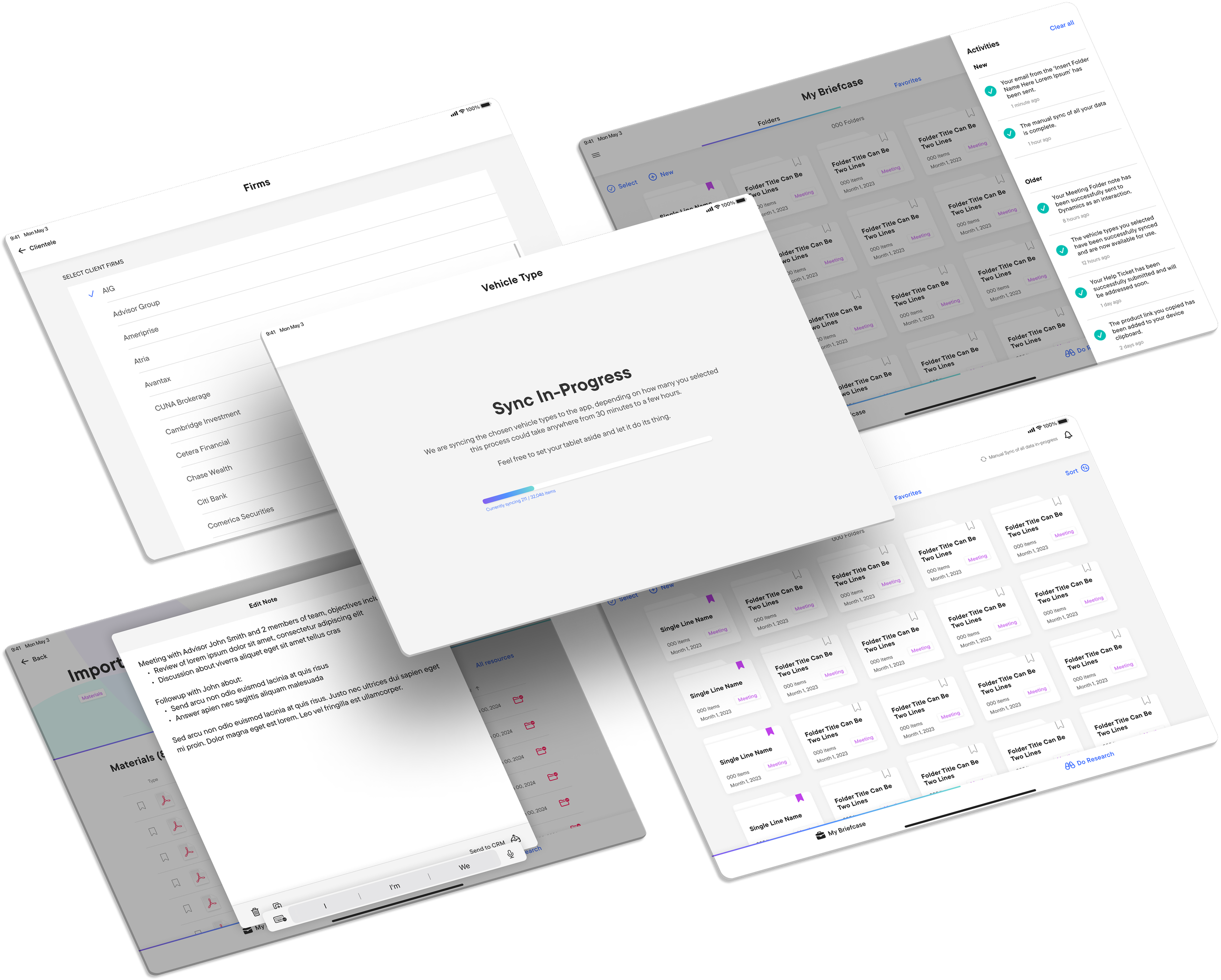
I designed Client Focus Mode to help associates quickly access relevant documents by pre-selecting target firms before meetings. A simple settings filter streamlined file access, reducing clutter and surfacing only what was needed.
✅ Streamlined Workflow Efficiency – Associates could now pre-select firms they needed to focus on, ensuring a distraction-free interface during meetings.
✅ Enhanced Client Engagement – With unnecessary documents hidden, associates could confidently share their screens without the risk of exposing irrelevant or sensitive information.
✅ Reduced Cognitive Load – Even beyond meetings, this feature became essential for preparation, allowing associates to organize their materials efficiently.
Guided by analytics and user feedback, I designed the mode to minimize touchpoints and seamlessly integrate into the existing UI for a smoother user experience.
To integrate the feature seamlessly, I revamped the app’s settings, giving associates more control over their workspace. Through workflow analysis and A/B testing, I improved customization of firm displays and folder queues.
Support for Broader Project Goals: The updated Settings and Client Focus Mode worked together to streamline access and protect data, supporting the app’s broader goal of efficient, secure client interactions.
Enhanced User Autonomy: By allowing associates to customize their firm display and folder queue, the revamped Settings feature empowered users to tailor the app to their specific needs, enhancing their control over the workspace.
Positive Impact on User Satisfaction: Enhancing the Settings feature boosted usability and customization, leading to increased user satisfaction, engagement, and app adoption among Franklin Templeton associates.
By optimizing the Settings experience, I ensured Client Focus Mode felt seamless—not just a feature, but an integrated part of the workflow.

Building a Smarter Settings Experience
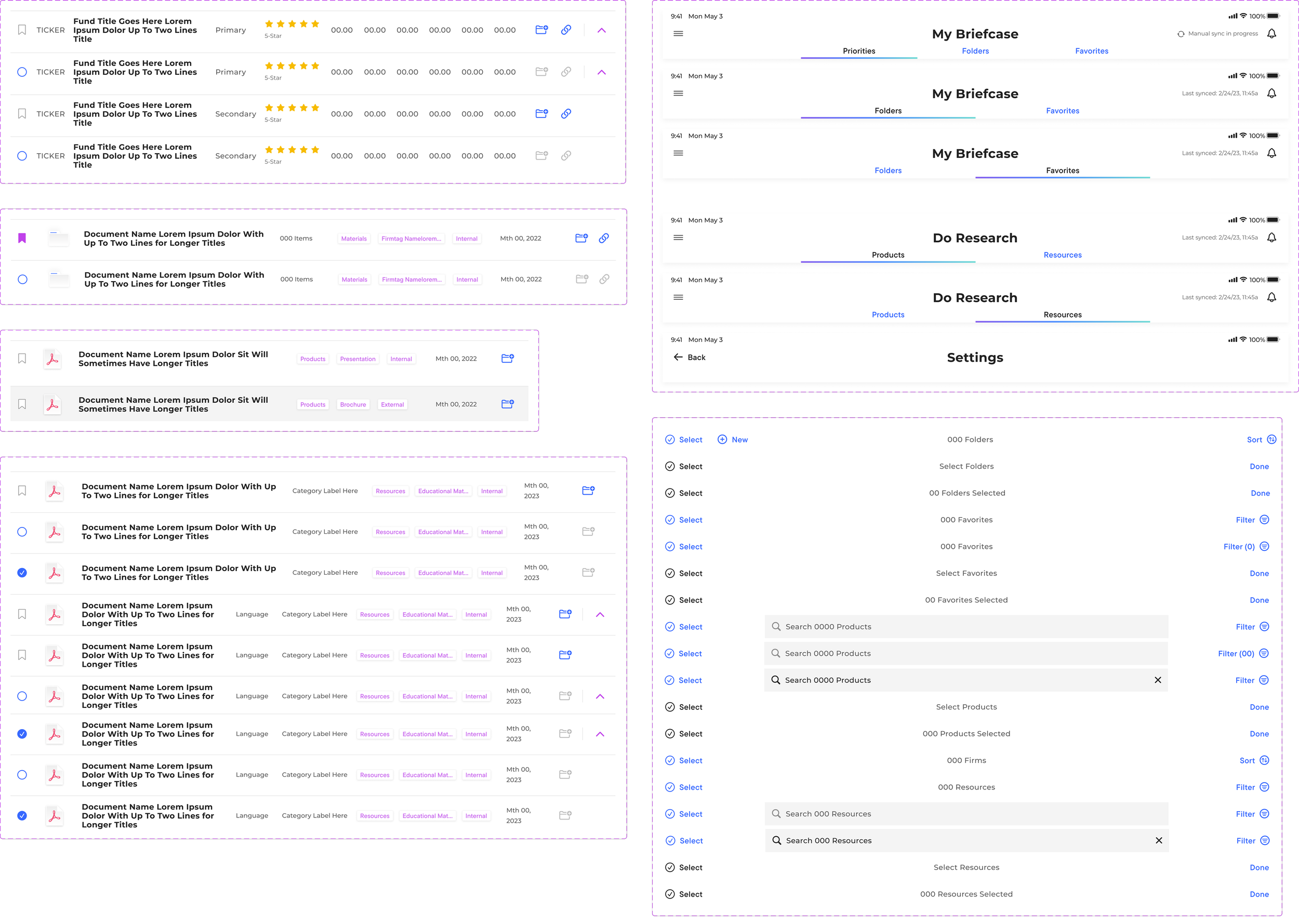
As I introduced new features, I took a modular approach to Franklin Templeton’s design system—building reusable, adaptable components that balanced consistency, flexibility, and scalability as the app evolved.
✅ New UI Components – I introduced dynamic filtering modules, interactive dropdowns, and responsive elements to maintain design integrity across devices.
✅ Scalability Enhancements – Each component was rigorously tested to ensure it worked across different firm structures and user needs.
✅ Expanded UI Assets – Updates included new icons, sidebar structures, page menus, and document preview enhancements, ensuring a cohesive visual language.
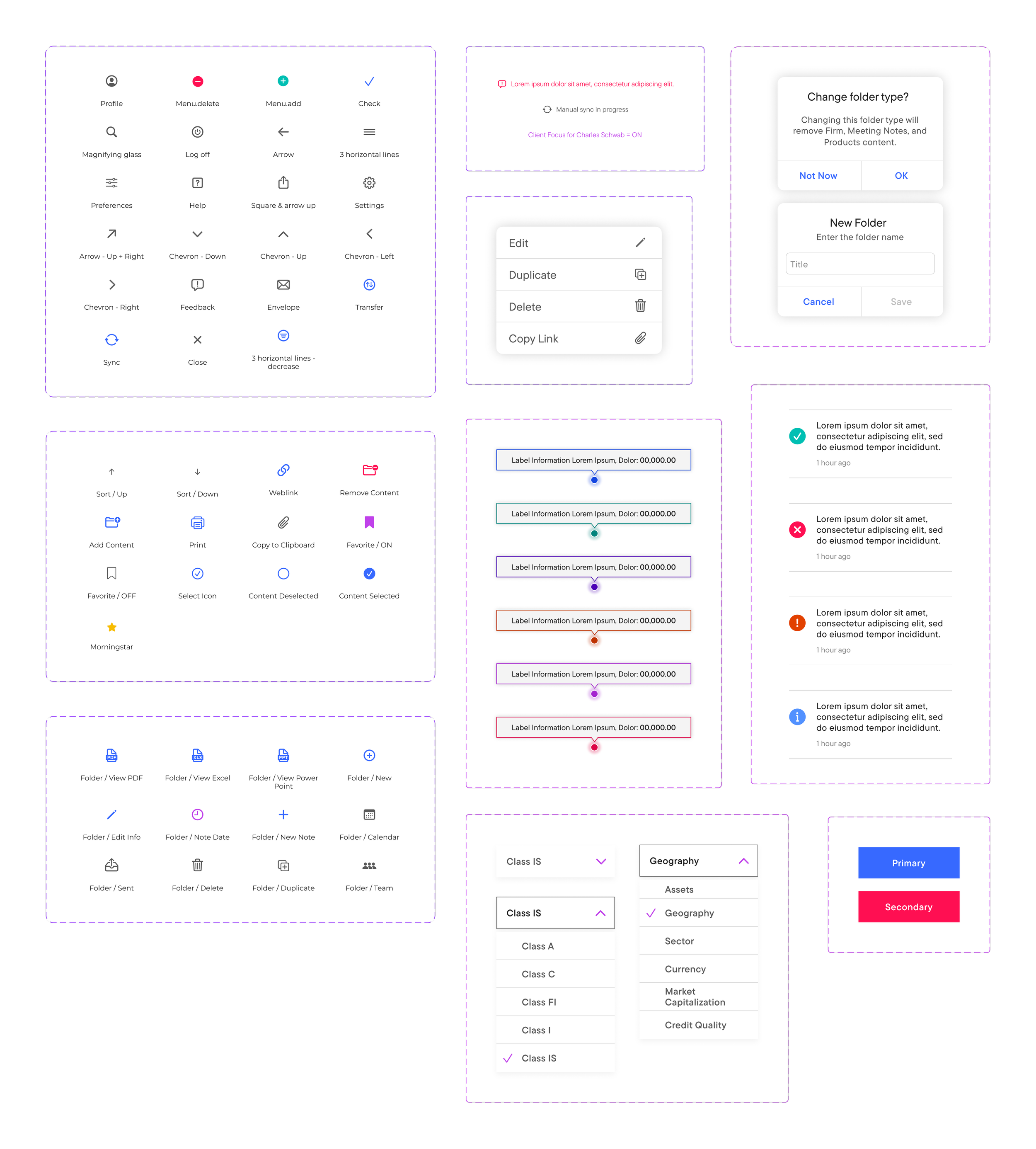
In support of both 11- and 13-inch iPad Pros, I applied responsive design principles to adapt the Briefcase app—ensuring consistent usability and seamless functionality across screen sizes.
Refined page templates to adapt fluidly to both screen sizes.
Optimized UI spacing and component scaling to maintain a consistent experience between both devices.
Ensured touch targets and interactions remained seamless regardless of device sizing.
This allowed Franklin Templeton associates to transition smoothly between devices, without feeling a difference in usability.
Breaking Free from iOS Dependencies
A major challenge was decoupling Franklin Templeton’s design system from native iOS components, which had caused inconsistencies over time. Removing this dependency led to a more unified, maintainable design system.
Enhanced Design Consistency: Decoupling from iOS ensured FT UI components stayed consistent across Apple updates, preserving design integrity and functionality.
Improved Stability: By avoiding iOS update disruptions, the app’s UI remains consistent—boosting designer confidence and speeding up production.
Controlled Updates: Decoupling from iOS lets the design team align updates with app needs and business goals, rather than reacting to system changes.

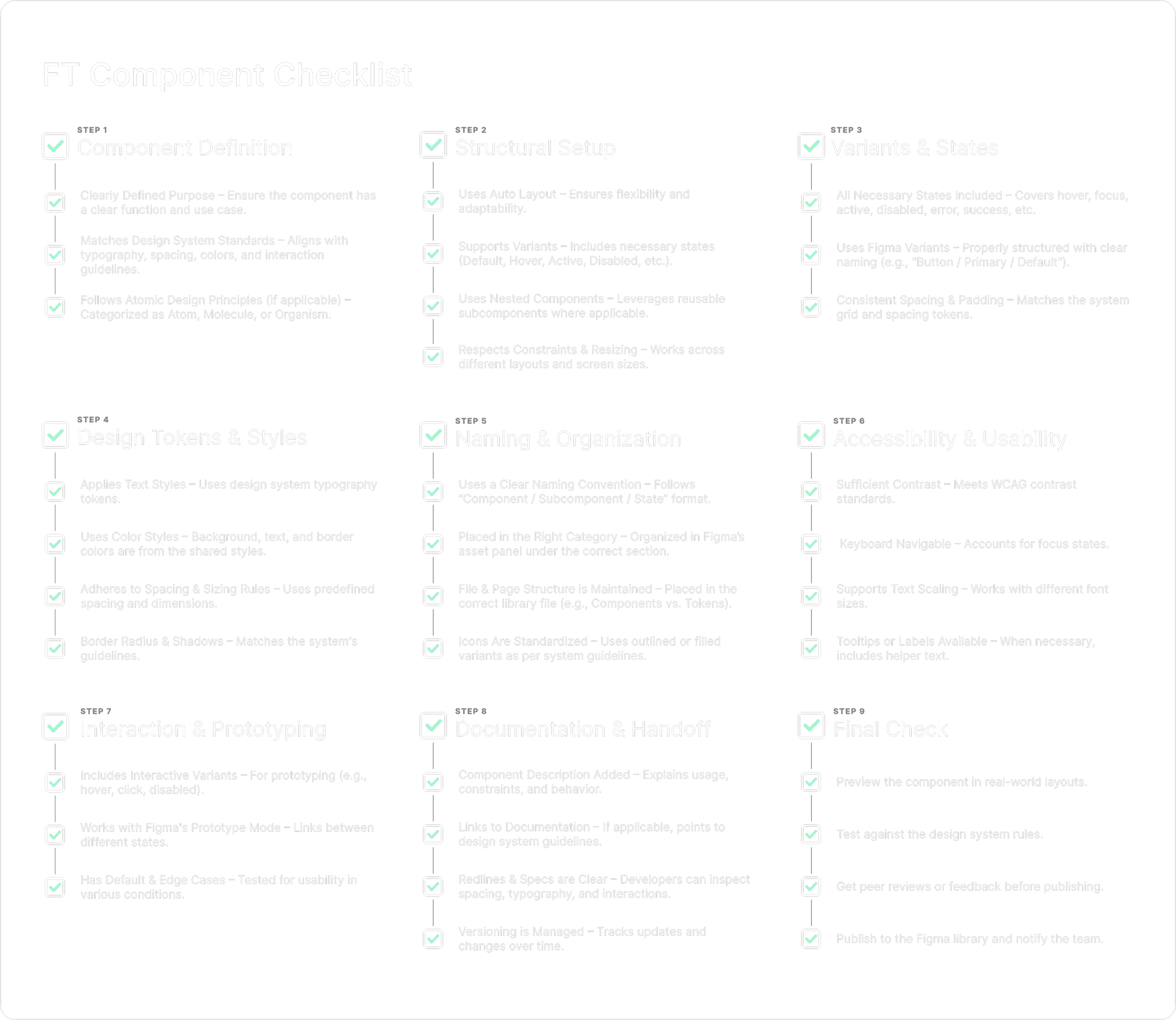
Component Checklist
To maintain improvements, I created a structured component checklist with clear UI guidelines—ensuring design consistency, quality control, and faster onboarding and development.
Design System
Scaling For The Future
Responsive Updates
Designing For Multiple Devices

Wrap up
This project required a versatile skillset to support the Briefcase app’s development. My contributions—ranging from feature enhancements and responsive design to decoupling from iOS and creating a component checklist—helped reduce information overload, improve workflows, and maintain design consistency. While we fell short of the 30–35% productivity goal, the app still achieved a 25% boost in sales productivity at launch, demonstrating the impact of thoughtful, user-centered design.

other work.
-
![]()
Big League AI
-
![]()
CFB Lately
-
![]()
Powerful Web
-
![]()
Fluidra
-
![]()
CalAmp